
0
6
AI Photoshoot
Winter cabin portrait
Winter portrait direction with a clean seasonal look.
Create professional-style AI photoshoots online with ZenCreator AI. Turn a selfie, reference photo, or creative direction into headshots, portraits, lifestyle visuals, social media images, and brand-ready photo concepts.
Use ZenCreator AI Photoshoot Generators when you need fresh visual content without planning a full studio shoot for every profile, campaign, product launch, or social media update.
Studio headshot, clean background, soft light, creator-ready profile image

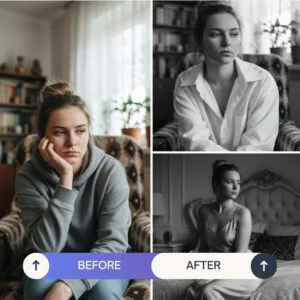


ZenCreator AI Photoshoot Generators are pre-built AI workflows that help users create photo-style images from a selfie or reference image. Instead of writing complex prompts or arranging a full photoshoot, users can choose a photoshoot style, upload a suitable image, and generate new visual options for personal branding, social content, creator profiles, marketing, and campaign planning.
Use them for professional-style headshots, creator profile photos, lifestyle portraits, fashion-inspired visuals, social media images, brand campaign concepts, ecommerce lifestyle scenes, portfolio-style images, team profile concepts, and content creator visuals.

Choose a ready-made photoshoot direction instead of building every prompt manually. These cards show the kind of portrait, lifestyle, office, fashion, and creator-ready styles users can explore.
Winter portrait direction with a clean seasonal look.

Street portrait concept with colorful urban energy.

Gallery-style editorial photoshoot for premium visuals.

Outdoor fitness portrait for sports and active lifestyle content.

Comfortable indoor lifestyle scene with a warm evening mood.

Business-ready photoshoot concept for profiles and brand pages.

Office portrait concept for founders, teams, and consultants.

Clean portrait photoshoot style for personal branding visuals.
A strong AI photoshoot starts with a clear input. The better the reference image, the easier it is for the generator to understand the subject, framing, and visual direction.
Professional studio portrait, neutral background, soft lighting, confident expression, clean modern styleOutdoor lifestyle portrait, warm natural light, relaxed pose, modern creator branding, vertical social formatModern business headshot, clean background, soft studio light, professional outfit, polished personal brand look
Move from a basic reference image to multiple polished visual directions without booking a studio session for every content need.
Use generated portrait and headshot concepts for profile planning, website visuals, personal branding, and campaign moodboards.
Try professional, lifestyle, editorial, fashion, office, outdoor, seasonal, or creator-focused styles from one workflow.
Create more portrait and lifestyle options for testing, planning, and content calendars.
Use outputs for profiles, landing pages, ads, newsletters, creator kits, and brand campaigns.
Upscale, edit, create carousels, animate images, or use related tools for a larger workflow.
Choose ready-made generator styles instead of building every prompt manually.
Start with a selfie or reference photo so the tool can create a new photoshoot-style direction.
Create professional-style portraits, personal branding photos, and business-style images.
Generate lifestyle visuals for social media, creator branding, ecommerce campaigns, and content planning.
Use different generator styles for professional, outdoor, office, fashion, seasonal, or editorial goals.
Use connected tools when you want clearer, sharper, or more polished output before publishing.
Reduce advanced prompt writing by starting with optimized photoshoot generator workflows.
Pick business headshot, studio portrait, lifestyle photo, social media image, fashion-style visual, office portrait, outdoor creator photo, or brand campaign image.
Use a clear image that you own or have permission to use. Good lighting, visible face, sharp focus, and minimal obstruction usually help.
The generator creates new photoshoot-style outputs based on your selected style and input.
Choose the strongest image direction based on composition, lighting, framing, and brand fit.
Use editing or upscaling tools to improve clarity, crop, details, or final presentation quality.
Use the result for social media, profile planning, websites, brand assets, campaign drafts, or content calendars.
Optional connected workflow: turn a selected portrait or lifestyle image into a short motion clip with Image to Video AI.
They are useful when you need fresh portrait or lifestyle visuals for a profile, campaign, content calendar, website, or brand concept.
This page focuses on portrait, headshot, lifestyle, and creator photoshoot use cases instead of broad image generation.
Pre-configured workflows can reduce the need for advanced prompt writing.
The researched AI Photoshoot category lists 39 generator styles, giving users multiple starting points.
Connect photoshoot creation with editing, upscaling, AI image generation, carousel creation, image-to-video, and AI video workflows.
Use it for profile visuals, social images, website portraits, marketing assets, and brand photoshoot concepts.
Keep pricing, commercial-use guidance, privacy, responsible AI, and help pages close to upload and CTA areas.
Some users search for AI Photoshoot Generators Free because they want to test a tool before buying credits or choosing a plan. ZenCreator AI may offer starter access, trials, previews, or credit-based usage depending on the current pricing setup.
Do not claim the photoshoot generators are free unless the live product clearly offers free credits or a free plan.
View Pricing and CreditsSome users search for unlimited photoshoot generators because they want high-volume generation. Avoid claiming unlimited usage unless the current plan truly provides it.
A safer message is that users can choose a credit package or plan that fits their creative volume, then generate photoshoot results based on available credits and current rules.
Check Current PlansGood inputs and clear goals can improve the final result. Use these checks before generating or publishing photoshoot outputs.
Choose a photo with good lighting, sharp focus, and a clear subject.
Blurry, dark, heavily filtered, or cropped images may reduce result quality.
Use headshot styles for business, lifestyle styles for social, and campaign styles for marketing.
Use 1:1 for profiles, 4:5 for feeds, 9:16 for Stories, and 16:9 for hero sections.
Use similar backgrounds, lighting, outfits, and color direction for one campaign.
Refine the final image before using it on a website, profile, ad, or marketing page.
Only upload photos, likenesses, client images, or brand assets that you own or have permission to process.
Check accuracy, brand fit, natural details, and usage rights before publishing.
Professional studio headshot, clean neutral background, soft lighting, confident expression, modern business styleNatural lifestyle portrait, warm outdoor light, relaxed creator pose, modern social media style, vertical 4:5 formatModern office portrait, clean workspace background, professional outfit, soft window light, polished startup founder styleEditorial portrait with cinematic lighting, minimal background, confident pose, premium magazine-style compositionBright profile photo for social media, clean background, friendly expression, modern creator branding, square format| Need | Basic Photo App | ZenCreator AI Photoshoot Generators |
|---|---|---|
| Photoshoot concepts | Manual editing or filters | Pre-configured AI photoshoot styles |
| Prompting | Often manual | Prompt-light generator workflow |
| Headshots | Limited retouching | Dedicated headshot and portrait-style outputs |
| Lifestyle visuals | Requires real shoot or heavy editing | AI-generated lifestyle-style concepts |
| Creative variations | Time-consuming | Multiple style directions from one workflow |
| Workflow after creation | Separate tools needed | Upscaling, editing, video, carousel, and template links |
| Learning support | External tutorials | Connects to AI University and prompt guides |
| Trust guidance | Often unclear | Links to pricing, privacy, terms, responsible AI, and help pages |
Create headshots, portraits, lifestyle images, creator visuals, and brand-ready photoshoot concepts from one AI creative studio. Choose a photoshoot generator, upload a suitable reference image, and create polished visual directions faster.